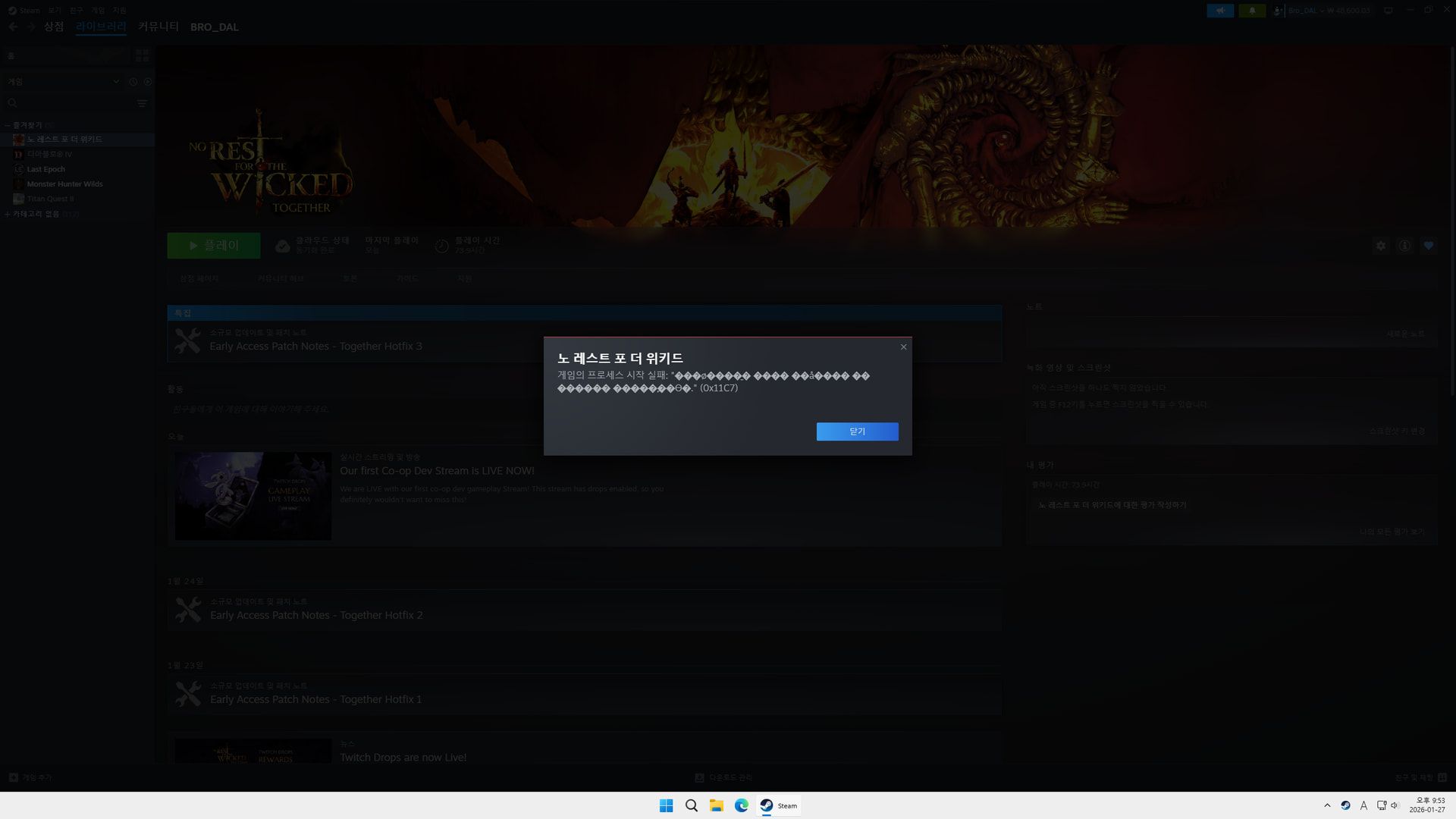
Same here, if others see this please also reply if you have the same issue for visibility to the devs!
This makes the game unplayable unless smartapp is permanently disabled.
I have the same problem. Just posted a thread related to this, with some research done.
same here , exact same issue
You could try add an exclusion for no rest for the wicked in windows security?
done that,didnt solved


Did you restart pc after adding it to exclusion?
Before you do that you can try running the game as administrator.
There’s no way to whitelist an app in SAC
No but you can go to Windows Security > Virus & threat protection > Manage settings > Add or remove exclusions
Heres another setting that can cause problems when it come to certain games and that is turning off controlled folder access or allowing the game through controlled folder access.
Reminder to restart PC before starting up the Game because some settings doesnt always take effect directly after changing them..
just for my sake, this is the error everyone is getting?

Since this is a new problem, please submit your files according to: How to Properly Report Bugs!
If you have also commented in the other topic, don’t double share for our sakes.
Feel free to add any information you think might be important to solve this!
Silas
yes, that is the error
I’ve been playing fine until the end of free weekend, on 01/26. I liked the game and decided to buy.
But now the game won’t launch anymore, while every other game I have seems fine. I tried verifying game files integrity and doing a complete reinstall, but nothing seems to work. I’m receiving code 0x11C7 which states “An App Control policy has blocked this file”, or something like that. After some research, I found out that this is related to untrusted file signature involving a program, which I know shouldn’t apply to this game.
Still, couldn’t fix it anyway. Some people said that disabling Smart App Control is a workaround for the problem, but it’s irreversible and I won’t do it only for the sake of NRFTW. Maybe you guys have any ideas? Could devs look into it? An image of the error is attached. Please, let me know if there’s going to be a fix so I can refund if not.
Thanks!
EDIT: Here’s the error log from eventvwr.msc
Code Integrity determined that a process (\Device\HarddiskVolume3\Program Files (x86)\Steam\steam.exe) attempted to load \Device\HarddiskVolume3\Program Files (x86)\Steam\steamapps\common\NoRestForTheWicked\NoRestForTheWicked.exe that did not meet the Enterprise signing level requirements or violated code integrity policy (Policy ID:{0283ac0f-fff1-49ae-ada1-8a933130cad6}).
EDIT2: At mod request, here is the link to the files. Note that there wasn’t a Player-prev.log file available.

im having the same problem . worked fine during the weekend and today i have the exact same issue , and im not willing to turn off SAC just for the sake of playing NRFTW
Since this is a new problem, please everyone present here now submit some files for us so this can be looked into. Follow these instructions: How to Properly Report Bugs! .
If you can edit your original post please with links to your file bundles.
If someone here is NOT on windows 11, please let us also know!
Silas
Edited my original post with a link to the requested files. Please, let me know if there’s something missing (besides the player-prev.log, which I didn’t have)
unfortunately, it didn’t work.
TLDR: Force Run Windows Update (gak) / Disable Smart App Control / Try running as Admin.
Windows 11 is the only known legal virus imho. Smart App Control is an insidious overzealous version of a Firewall mixed with Antivirus, sort of.
Policies are windows Admin moderated settings, or in Win11’s case, Microsoft’s choices for how your computer should run whether you like it or not. The policy being referred to by error 0xc117 are a bit vague in that it is all encumberant on updates and security.
However in this case, we know 100% it is Smart App Control. The simplest fix is to disable this rubbish entirely. But first simply force a Windows Update from the relevant Settings page.
The only reason you would not remove Smart App Control is if you are a complete rube when it comes to deciding what to click on and when, have zero firewall settings, zero antivirus, zero anti spyware, and are consistently browsing midget porn and installing random pirated software. By “mistake”.
Your only other attempt at fixing would be to run the game as Admin:
- Right click the game in your steam Library list, select Properties
- Select the tab Installed Files, and click …Browse next to the folder location top right.
- Now find the executable, in this case “NoRestForTheWicked.exe” and right click properties on this file.
FIRST - Click Run as Administrator. If this solves your problem….
THEN - Click Properties, Compatibility, check “Run this program as an administrator”. Click Ok.

To disable Smart App Control:
- Open Windows Settings from the Start Menu
- Click Privacy and Security > Windows Security > App & Browser Control
- Now toggle the thing off.
The warnings that you cannot turn it back on without a full system re-install should be enough to tell you how ghastly this “feature” is and be happily rid of it.
You will also find, with a simple Googling, a plethora of complaints including months long petitions for Microsoft to remove this. But this is off subject. I guess.
Tadaaa.
This is a Win11 only “feature”.
Same issue here. I have added exclusions for the exe the folder and nothing has changed. Yes, even after a restart and verifying my files. The game was running great yesterday and today I get the code 0x11C7. Hopefully there is a fix in the near future.